
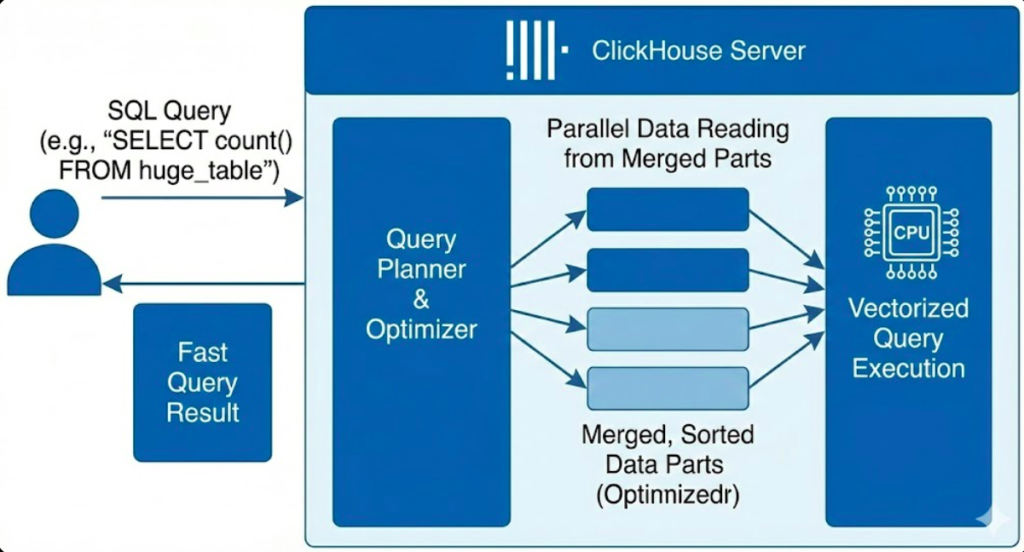
Welcome to the most comprehensive ClickHouse tutorial for beginners! Whether you’re a data engineer, analyst, or developer, this ClickHouse tutorial for beginners will teach you everything you need to know about the world’s fastest analytics database. By the end of this beginner-friendly ClickHouse tutorial, you’ll be able to install ClickHouse, write queries, optimize performance, and build real-world analytics applications.
ClickHouse processes billions of rows per second and is used by companies like Uber, Cloudflare, and eBay. With data analytics becoming critical for every business, ClickHouse skills are in high demand with salaries ranging from $120k-$180k/year for database engineers.
📑 Table of Contents
1. What is ClickHouse?
ClickHouse is an open-source column-oriented database management system (DBMS) designed for online analytical processing (OLAP). Think of it as a supercharged database that can analyze massive datasets in real-time.
Unlike traditional row-oriented databases (like MySQL or PostgreSQL), ClickHouse stores data by columns, making it 100-1000x faster for analytical queries.
Traditional Databases
Row-Oriented Storage
- Good for transactions
- Read entire rows
- Slower for analytics
Example: MySQL, PostgreSQL
ClickHouse
Column-Oriented Storage
- Optimized for analytics
- Read only needed columns
- Lightning-fast aggregations
Perfect for big data analysis
Key Features
2. Why Use ClickHouse?
This ClickHouse tutorial for beginners shows that ClickHouse excels in scenarios where you need to analyze large amounts of data quickly. Here’s when you should use it:
Perfect Use Cases
- Web Analytics – Track millions of page views and user events (like Google Analytics)
- Business Intelligence – Generate real-time dashboards and reports
- Log Analysis – Process server logs, application logs, and metrics
- Product Analytics – Analyze user behavior and feature usage
- Financial Analysis – Process stock market data and trading analytics
- IoT Data – Handle sensor data from thousands of devices
- E-commerce – Analyze sales trends, inventory, and customer patterns
When NOT to Use ClickHouse
- Transactional systems (OLTP) – Use PostgreSQL instead
- Frequent updates/deletes – ClickHouse is append-only optimized
- Small datasets (< 1 million rows) - Traditional DBs are simpler
- Point lookups by primary key – Not as fast as key-value stores
3. Installation & Setup
This part of our ClickHouse tutorial for beginners will get ClickHouse running on your machine. I’ll show you the easiest methods for different operating systems.
Option 1: This ClickHouse tutorial for beginners recommends: Start with Docker
The fastest way to try ClickHouse is using Docker:
# Pull the latest ClickHouse image
docker pull clickhouse/clickhouse-server

# Run ClickHouse server
docker run -d \
  --name clickhouse-server \
  -p 8123:8123 \
  -p 9000:9000 \
  clickhouse/clickhouse-server

# Access ClickHouse client
docker exec -it clickhouse-server clickhouse-client
ClickHouse client version, you’ve successfully installed ClickHouse. Type SELECT 1 and press Enter to test it.
Option 2: Install on Ubuntu/Debian
This part of this ClickHouse tutorial for beginners covers installation of dependency.
# Add ClickHouse repository
sudo apt-get install -y apt-transport-https ca-certificates dirmngr
GNUPGHOME=$(mktemp -d)
sudo GNUPGHOME="$GNUPGHOME" gpg --no-default-keyring \
  --keyring /usr/share/keyrings/clickhouse-keyring.gpg \
  --keyserver hkp://keyserver.ubuntu.com:80 \
  --recv-keys 8919F6BD2B48D754
sudo rm -rf "$GNUPGHOME"
sudo chmod +r /usr/share/keyrings/clickhouse-keyring.gpg

echo "deb [signed-by=/usr/share/keyrings/clickhouse-keyring.gpg] \
  https://packages.clickhouse.com/deb stable main" | \
  sudo tee /etc/apt/sources.list.d/clickhouse.list

# Install ClickHouse
sudo apt-get update
sudo apt-get install -y clickhouse-server clickhouse-client

# Start the service
sudo service clickhouse-server start

# Connect to ClickHouse
clickhouse-client
Option 3: Install on macOS
This part of this ClickHouse tutorial for beginners covers installation of clickhouse.
# Using Homebrew
brew install clickhouse

# Start ClickHouse server
clickhouse-server

# In a new terminal, connect to client
clickhouse-client
The next part of this ClickHouse tutorial for beginners covers installation of dependency.
Option 4: ClickHouse Cloud (Easiest, No Installation)
🚀 Continue your ClickHouse tutorial for beginners with a free cloud instance
Get started in 30 seconds with a fully managed ClickHouse instance. No installation, no configuration.
Start Free Trial →💳 No credit card required | ⚡ 30-day free tier
4. Basic Concepts
Before we dive into queries in this ClickHouse tutorial for beginners, let’s understand the core concepts of ClickHouse:
Database Hierarchy
ClickHouse Server
├── Database 1
│   ├── Table 1
│   ├── Table 2
│   └── Table 3
└── Database 2
    ├── Table 1
    └── Table 2
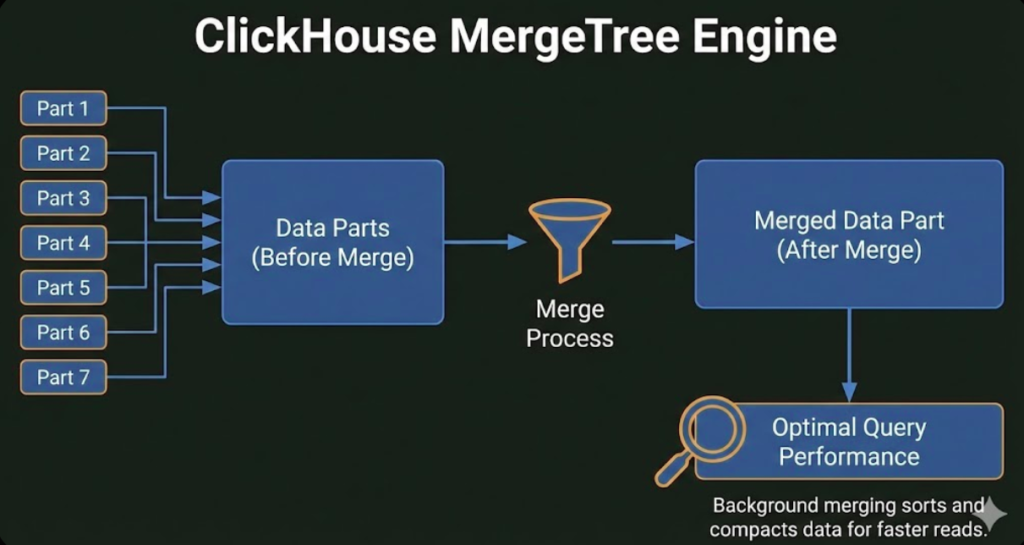
Table Engines
ClickHouse uses different table engines to optimize for different use cases. Here are the most important ones:
| Engine | Use Case | When to Use |
|---|---|---|
| MergeTree | General purpose | 90% of use cases – your default choice |
| ReplicatedMergeTree | High availability | Production systems with replication |
| SummingMergeTree | Pre-aggregation | Sum metrics automatically |
| AggregatingMergeTree | Advanced aggregation | Complex rollups and pre-calculations |
| Distributed | Sharding | Spread data across multiple servers |
MergeTree. It’s fast, reliable, and handles most scenarios. You can explore other engines later as you scale.
5. Creating Your First Database
In this section of our ClickHouse tutorial for beginners, let’s create a database and table to track website analytics. This is a real-world example you can use immediately.
1Create a Database
This part of this ClickHouse tutorial for beginners covers table creation.
-- Create database
CREATE DATABASE analytics;

-- Switch to the database
USE analytics;

-- Verify it was created
SHOW DATABASES;
2Create a Table
In this practical section of our ClickHouse tutorial for beginners, let’s create a table to store page view events:
CREATE TABLE page_views (
    event_time DateTime,
    user_id UInt32,
    page_url String,
    country String,
    device String,
    session_duration UInt32
) ENGINE = MergeTree()
ORDER BY (event_time, user_id);
Let’s break this down:
DateTime– Timestamp of the eventUInt32– Unsigned 32-bit integer (perfect for IDs)String– Variable-length textENGINE = MergeTree()– Use the MergeTree engineORDER BY (event_time, user_id)– How data is sorted on disk (critical for query performance!)
ORDER BY defines how data is physically stored on disk. Choose columns you’ll filter by most often (like timestamps and IDs).
Continuing with this ClickHouse tutorial for beginners…
3Insert Sample Data
This part of this ClickHouse tutorial for beginners covers insertion of sample data
-- Insert sample data
INSERT INTO page_views VALUES
    ('2025-01-01 10:00:00', 1001, '/home', 'USA', 'mobile', 45),
    ('2025-01-01 10:05:00', 1002, '/products', 'UK', 'desktop', 120),
    ('2025-01-01 10:10:00', 1001, '/cart', 'USA', 'mobile', 30),
    ('2025-01-01 10:15:00', 1003, '/home', 'Canada', 'tablet', 60),
    ('2025-01-01 10:20:00', 1002, '/checkout', 'UK', 'desktop', 90);

-- Verify the data
SELECT * FROM page_views LIMIT 5;
Continuing with this ClickHouse tutorial for beginners…
6. Understanding Data Types
As you’ll learn in this ClickHouse tutorial for beginners, ClickHouse has many data types optimized for different scenarios. Here are the most important ones for beginners:
Numeric Types
| Type | Range | Use Case |
|---|---|---|
UInt8 |
0 to 255 | Small counts, flags |
UInt32 |
0 to 4 billion | User IDs, counts |
UInt64 |
0 to 18 quintillion | Large IDs, timestamps |
Int32 |
-2B to +2B | Signed integers |
Float32 |
7 decimal digits | Approximate decimals |
Float64 |
15 decimal digits | High precision decimals |
Decimal(P,S) |
Exact precision | Money, exact calculations |
Date & Time Types
| Type | Format | Use Case |
|---|---|---|
Date |
YYYY-MM-DD | Dates without time |
DateTime |
YYYY-MM-DD HH:MM:SS | Timestamps (1-second precision) |
DateTime64(3) |
With milliseconds | High-precision timestamps |
String Types
String– Variable-length strings (most common)FixedString(N)– Fixed-length strings (like char codes)Enum8/Enum16– Predefined set of values (saves space)
Array & Complex Types
-- Array of integers
tags Array(String)

-- Nested structure
user Tuple(id UInt32, name String, email String)

-- Array of tuples
events Array(Tuple(name String, timestamp DateTime))
UInt8 instead of UInt64 can save 7 bytes per row. With billions of rows, this adds up!
7. Writing Queries
This ClickHouse tutorial for beginners will now show you how to query data. ClickHouse uses SQL with some powerful extensions.
Basic SELECT Queries
-- Simple select
SELECT * FROM page_views LIMIT 10;

-- Select specific columns
SELECT event_time, page_url, country
FROM page_views
LIMIT 5;

-- Filter with WHERE
SELECT * FROM page_views
WHERE country = 'USA'
  AND device = 'mobile';

-- Count rows
SELECT count() FROM page_views;

-- Unique countries
SELECT DISTINCT country FROM page_views;
Aggregation Queries
Continue with ClickHouse tutorial for beginners…
This is where ClickHouse really shines! Aggregations are lightning-fast.
-- Page views by country
SELECT
    country,
    count() as views
FROM page_views
GROUP BY country
ORDER BY views DESC;

-- Average session duration by device
SELECT
    device,
    avg(session_duration) as avg_duration,
    count() as total_sessions
FROM page_views
GROUP BY device;

-- Page views per hour
SELECT
    toStartOfHour(event_time) as hour,
    count() as views
FROM page_views
GROUP BY hour
ORDER BY hour;
Time-Series Analysis
As you’ve learned throughout this ClickHouse tutorial for beginners, ClickHouse has amazing time functions:
-- Daily page views
SELECT
    toDate(event_time) as date,
    count() as views
FROM page_views
GROUP BY date
ORDER BY date;

-- Views by day of week
SELECT
    toDayOfWeek(event_time) as day_of_week,
    count() as views
FROM page_views
GROUP BY day_of_week
ORDER BY day_of_week;

-- Last 7 days
SELECT
    toDate(event_time) as date,
    count() as views
FROM page_views
WHERE event_time >= now() - INTERVAL 7 DAY
GROUP BY date;
Advanced Aggregations
-- Top 10 pages
SELECT
    page_url,
    count() as views,
    uniq(user_id) as unique_users,
    avg(session_duration) as avg_duration
FROM page_views
GROUP BY page_url
ORDER BY views DESC
LIMIT 10;

-- Percentiles
SELECT
    quantile(0.5)(session_duration) as median,
    quantile(0.95)(session_duration) as p95,
    quantile(0.99)(session_duration) as p99
FROM page_views;
LIMIT when exploring data. ClickHouse can return millions of rows instantly, which might overwhelm your client!
JOINs in ClickHouse
Let’s create a users table and join it with page views:
-- Create users table
CREATE TABLE users (
    user_id UInt32,
    name String,
    signup_date Date
) ENGINE = MergeTree()
ORDER BY user_id;

-- Insert sample users
INSERT INTO users VALUES
    (1001, 'Alice', '2024-12-01'),
    (1002, 'Bob', '2024-12-15'),
    (1003, 'Charlie', '2025-01-01');

-- Join page views with user names
SELECT
    u.name,
    count() as page_views
FROM page_views pv
JOIN users u ON pv.user_id = u.user_id
GROUP BY u.name
ORDER BY page_views DESC;
8. Performance Optimization
As covered in this ClickHouse tutorial for beginners, ClickHouse is fast by default, but these tips will make it even faster:
1. Choose the Right ORDER BY
-- Good: Columns you filter by most
CREATE TABLE events (
    timestamp DateTime,
    user_id UInt32,
    event_type String
) ENGINE = MergeTree()
ORDER BY (timestamp, user_id);  -- ✅ Optimized for time-range queries

-- Bad: Random order
ORDER BY event_type;  -- ❌ Not useful for typical queries
2. Use PARTITION BY for Time-Series Data
CREATE TABLE events (
    timestamp DateTime,
    user_id UInt32,
    event_type String
) ENGINE = MergeTree()
PARTITION BY toYYYYMM(timestamp)  -- Partition by month
ORDER BY (timestamp, user_id);
Why partition? You can delete old data quickly and queries on recent data are faster.
3. Add Indexes for Better Performance
-- Add index on frequently filtered column
ALTER TABLE events
ADD INDEX idx_event_type event_type TYPE set(100) GRANULARITY 4;

-- Bloom filter index for string searches
ALTER TABLE events
ADD INDEX idx_url page_url TYPE bloom_filter() GRANULARITY 4;
4. Use Materialized Views for Pre-Aggregation
-- Create aggregated table
CREATE TABLE daily_stats (
    date Date,
    country String,
    total_views UInt64,
    unique_users UInt64
) ENGINE = SummingMergeTree()
ORDER BY (date, country);

-- Create materialized view to auto-populate
CREATE MATERIALIZED VIEW daily_stats_mv TO daily_stats AS
SELECT
    toDate(event_time) as date,
    country,
    count() as total_views,
    uniq(user_id) as unique_users
FROM page_views
GROUP BY date, country;
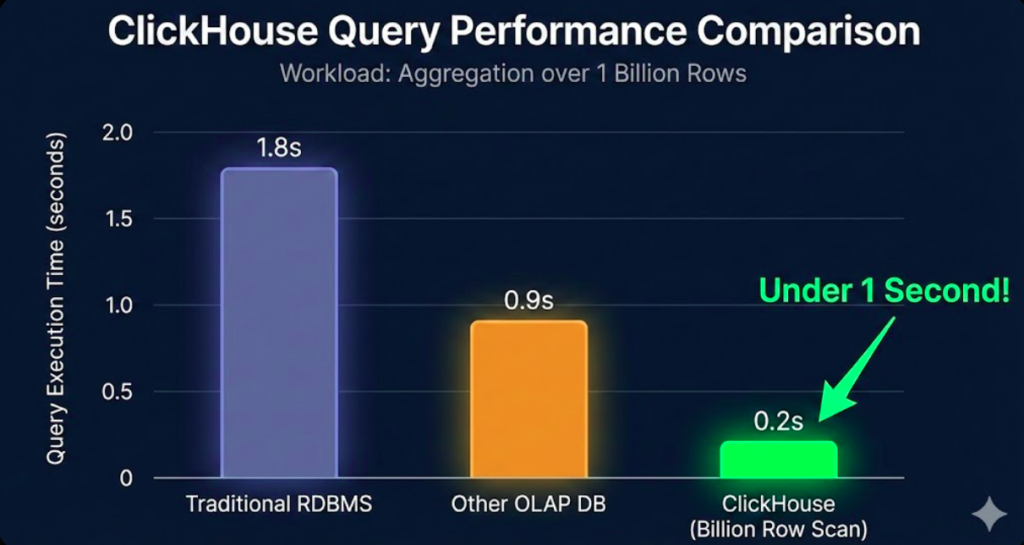
page_views is automatically aggregated into daily_stats. Queries on daily_stats are 100x faster!
Performance Chart
5. Batch Inserts
-- Bad: One row at a time (slow)
INSERT INTO events VALUES (...);
INSERT INTO events VALUES (...);
INSERT INTO events VALUES (...);

-- Good: Batch insert (fast)
INSERT INTO events VALUES
    (...),
    (...),
    (...);
9. Real-World Examples
Example 1: E-commerce Analytics
Following the steps in this beginner ClickHouse tutorial..
CREATE TABLE orders (
    order_id UInt64,
    customer_id UInt32,
    order_date DateTime,
    total_amount Decimal(10, 2),
    product_category String,
    country String
) ENGINE = MergeTree()
PARTITION BY toYYYYMM(order_date)
ORDER BY (order_date, customer_id);

-- Insert sample data
INSERT INTO orders VALUES
    (1001, 5001, '2025-01-01 10:00:00', 99.99, 'Electronics', 'USA'),
    (1002, 5002, '2025-01-01 11:30:00', 149.99, 'Clothing', 'UK'),
    (1003, 5001, '2025-01-02 14:20:00', 79.99, 'Electronics', 'USA'),
    (1004, 5003, '2025-01-02 16:45:00', 199.99, 'Home', 'Canada');
-- Daily revenue
SELECT
    toDate(order_date) as date,
    sum(total_amount) as revenue
FROM orders
GROUP BY date
ORDER BY date;

-- Revenue by category
SELECT
    product_category,
    count() as orders,
    sum(total_amount) as revenue,
    avg(total_amount) as avg_order_value
FROM orders
GROUP BY product_category
ORDER BY revenue DESC;

-- Customer lifetime value
SELECT
    customer_id,
    count() as total_orders,
    sum(total_amount) as lifetime_value,
    min(order_date) as first_order,
    max(order_date) as last_order
FROM orders
GROUP BY customer_id
ORDER BY lifetime_value DESC
LIMIT 10;
Example 2: Application Logs
Following the steps in this beginner ClickHouse tutorial..
CREATE TABLE app_logs (
    timestamp DateTime64(3),
    level Enum8('DEBUG'=1, 'INFO'=2, 'WARNING'=3, 'ERROR'=4),
    service String,
    message String,
    user_id UInt32
) ENGINE = MergeTree()
PARTITION BY toYYYYMMDD(timestamp)
ORDER BY (timestamp, service, level);
-- Error rate by service
SELECT
    service,
    countIf(level = 'ERROR') as errors,
    count() as total_logs,
    (errors / total_logs) * 100 as error_rate
FROM app_logs
WHERE timestamp >= now() - INTERVAL 1 HOUR
GROUP BY service
ORDER BY error_rate DESC;

-- Top error messages
SELECT
    message,
    count() as occurrences
FROM app_logs
WHERE level = 'ERROR'
  AND timestamp >= now() - INTERVAL 24 HOUR
GROUP BY message
ORDER BY occurrences DESC
LIMIT 20;
Example 3: IoT Sensor Data
Following the steps in this beginner ClickHouse tutorial..
CREATE TABLE sensor_data (
    timestamp DateTime,
    sensor_id UInt32,
    temperature Float32,
    humidity Float32,
    location String
) ENGINE = MergeTree()
PARTITION BY toYYYYMM(timestamp)
ORDER BY (timestamp, sensor_id);
-- Average temperature by hour
SELECT
    toStartOfHour(timestamp) as hour,
    avg(temperature) as avg_temp,
    max(temperature) as max_temp,
    min(temperature) as min_temp
FROM sensor_data
WHERE timestamp >= now() - INTERVAL 24 HOUR
GROUP BY hour
ORDER BY hour;

-- Detect anomalies (temperature > 2 standard deviations)
SELECT
    sensor_id,
    timestamp,
    temperature,
    avg(temperature) OVER (PARTITION BY sensor_id) as avg_temp,
    stddevPop(temperature) OVER (PARTITION BY sensor_id) as stddev_temp
FROM sensor_data
WHERE temperature > avg_temp + (2 * stddev_temp)
ORDER BY timestamp DESC;
10. Best Practices
✅ DO’s
- Use
MergeTreeengine for most tables - Choose ORDER BY wisely (columns you filter by)
- Batch inserts (1,000+ rows at once)
- Partition large tables by time
- Use materialized views for common queries
- Monitor query performance with EXPLAIN
- Use appropriate data types (smallest that fits)
- Add indexes on frequently filtered columns
❌ DON’Ts
- Don’t use for transactional workloads (OLTP)
- Don’t frequently UPDATE/DELETE rows
- Don’t use ClickHouse for small datasets
- Don’t create too many partitions (max 1,000)
- Don’t join very large tables without optimization
- Don’t insert one row at a time
- Don’t ignore compression settings
- Don’t forget to monitor disk space
Monitoring & Maintenance
-- Check table sizes
SELECT
    database,
    table,
    formatReadableSize(sum(bytes)) as size
FROM system.parts
WHERE active
GROUP BY database, table
ORDER BY sum(bytes) DESC;

-- Monitor running queries
SELECT
    query,
    elapsed,
    read_rows,
    formatReadableSize(read_bytes) as read
FROM system.processes
WHERE query NOT LIKE '%system.processes%';

-- Check disk usage
SELECT
    name,
    path,
    formatReadableSize(free_space) as free,
    formatReadableSize(total_space) as total
FROM system.disks;
11. Frequently Asked Questions (FAQ)
ALTER TABLE ... UPDATE and ALTER TABLE ... DELETE, but these are heavy operations. ClickHouse is optimized for append-only workloads.
BACKUP and RESTORE commands (new in v22.1+), or manually copy data directories. For production, set up replication with ReplicatedMergeTree tables.
12. Next Steps & Learning Resources
🎓 Now that you’ve finished this ClickHouse tutorial for beginners, here’s your recommended learning path:
✅ Try all examples
✅ Build a simple analytics project
📚 Study table engines
📚 Practice optimization
🚀 Learn replication
🚀 Build a real project
🎯 Custom functions
🎯 Performance tuning
📚 Official Resources
- Official Documentation: clickhouse.com/docs – Comprehensive and well-written
- ClickHouse Blog: clickhouse.com/blog – Use cases, benchmarks, tutorials
- GitHub: github.com/ClickHouse – Source code and examples
- Slack Community: Join the active Slack workspace for questions
💻 Hands-On Practice
🚀 Ready to Practice?
Get a free ClickHouse Cloud instance and try everything you learned:
Start Free Trial →✅ No credit card | ✅ 30-day trial | ✅ Full features
🎯 Project Ideas to Build
- Web Analytics Dashboard – Track your website traffic (like Google Analytics)
- Stock Market Analyzer – Store and analyze stock prices
- IoT Data Platform – Process sensor data from devices
- Log Aggregator – Centralize and analyze application logs
- E-commerce Analytics – Build sales reports and customer insights
- Social Media Analytics – Track engagement metrics
📖 Recommended Books & Courses
📚 Learn More with These Resources:
- ClickHouse Official Training – Free certification course
- “Learning ClickHouse” by O’Reilly (coming 2025)
- Udemy ClickHouse Courses – Practical video tutorials
- Real Python’s ClickHouse Guide – Python integration
🛠️ Recommended Tools
| Tool | Purpose | Price |
|---|---|---|
| DBeaver | Universal database client with ClickHouse support | Free |
| Grafana | Build beautiful dashboards | Free |
| Apache Superset | Modern BI platform | Free |
| ClickHouse Cloud | Fully managed hosting | Free tier available |
| Altinity.Cloud | Managed ClickHouse alternative | Paid |
🔥 Choose a hosting option perfect for this beginner ClickHouse tutorial
Need a production-ready ClickHouse instance?
Get $200 credit on DigitalOcean • Deploy in minutes
🎓 Certification & Career
- ClickHouse Engineer – $120k-180k/year
- Data Engineer – $110k-170k/year
- Analytics Engineer – $100k-150k/year
- Database Administrator – $95k-145k/year
Companies hiring: Uber, Cloudflare, eBay, Spotify, Bloomberg, Cisco
Congratulations on completing this comprehensive ClickHouse tutorial for beginners! You’ve learned
This ClickHouse tutorial for beginners has covered everything from installation to optimization. The skills you’ve gained from this ClickHouse tutorial for beginners will help you build production-ready analytics systems. Remember, the best way to master what you learned in this ClickHouse tutorial for beginners is through hands-on practice.
- ✅ What ClickHouse is and when to use it
- ✅ How to install and set up ClickHouse
- ✅ Creating databases and tables
- ✅ Writing queries and aggregations
- ✅ Performance optimization techniques
- ✅ Real-world use cases and examples
- ✅ Best practices and common pitfalls
Apply what you learned in this ClickHouse tutorial for beginners
Get started with a managed ClickHouse instance in 30 seconds:
Try ClickHouse Cloud Free →Or deploy on your own infrastructure with these hosts:
📬 Stay Updated
Want to stay current with ClickHouse best practices and new features?
- Subscribe to the ClickHouse Blog
- Follow @ClickHouseDB on Twitter
- Join the ClickHouse Slack community
- Watch the ClickHouse YouTube channel
Recommended Reading
Deep dive into database systems with these essential books trusted by 100,000+ engineers worldwide
The bible for understanding systems like ClickHouse
Happy querying! 🚀
Last updated: January 2025 | ClickHouse version 24.x+