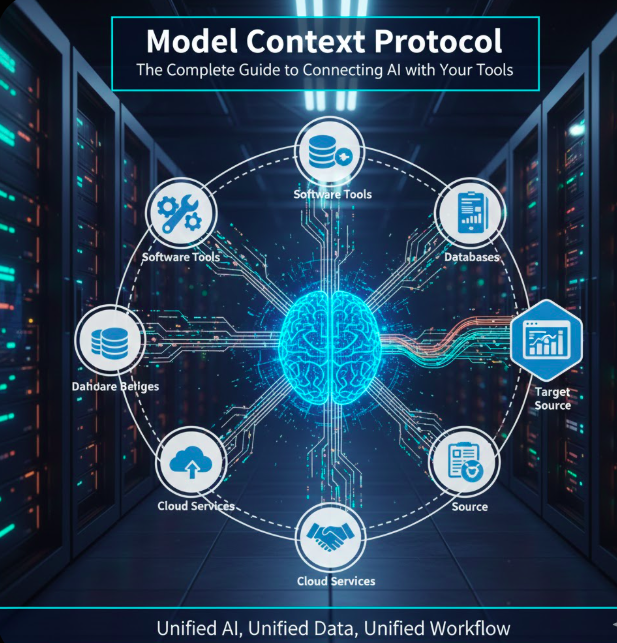
Model Context Protocol: The Complete Guide to Connecting AI with Your Tools
Discover how the model context protocol revolutionizes AI integration, making Claude and other AI assistants work seamlessly with your apps, databases, and tools
Imagine telling your AI assistant to “check my emails, update my calendar, and message my team about today’s meeting” – and having it actually do all of that automatically. That’s the power of the model context protocol.
In this comprehensive guide, I’ll walk you through everything you need to know about MCP, from what it is to how you can start using it today. Whether you’re a developer, business owner, or just curious about AI, you’ll find practical insights and real-world examples here.
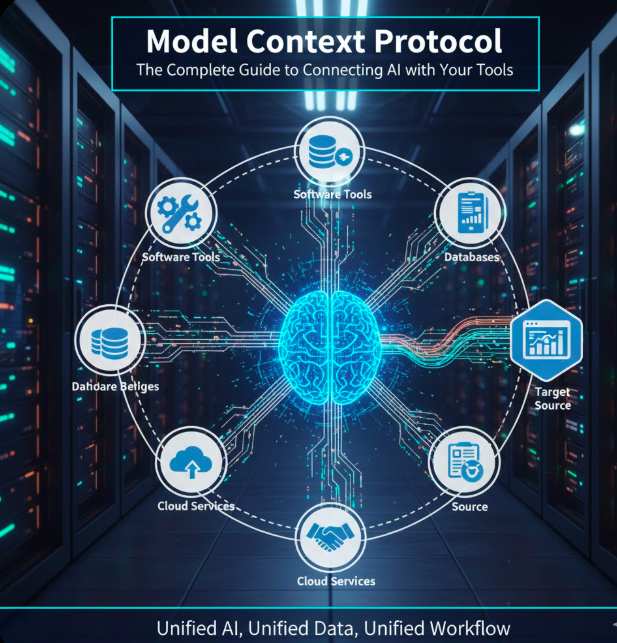
Table of Contents
What is Model Context Protocol?
The model context protocol (MCP) is an open standard created by Anthropic that allows AI assistants to securely connect with external data sources and tools. Think of it as a universal language that lets AI talk to your applications.
Released in November 2024, MCP solves a fundamental problem in AI: how to give AI assistants access to your data without building custom integrations for every single tool. Before MCP, connecting Claude to your Google Drive, Slack, or database required separate, complex integrations. Now, there’s one standardized way.
Simple Analogy: USB for AI
Remember when every phone had a different charging cable? Then USB became the standard, and suddenly one cable could charge everything. That’s exactly what the model context protocol does for AI – it’s the USB port that lets AI plug into any app or data source.
Key Components of Model Context Protocol
The model context protocol consists of three main parts:
- MCP Hosts: These are AI applications like Claude Desktop that want to access external data
- MCP Servers: Programs that provide access to specific tools or data sources (like a Google Drive MCP server)
- MCP Protocol: The standardized communication language between hosts and servers
Why the Model Context Protocol Matters
I’ve been working with AI tools for years, and I can tell you: the model context protocol is a game-changer. Here’s why it matters in the real world.
❌ Before MCP
- Separate integration for each tool
- Constant app switching
- Copy-pasting data manually
- Time-consuming workflows
- Limited AI capabilities
✅ With MCP
- One universal standard
- AI accesses everything directly
- Automatic data handling
- Hours saved daily
- AI works with your actual data
The Problem MCP Solves
Let me share a real story from my own experience. Last month, I needed to create a quarterly report that required data from Google Analytics, our Salesforce CRM, and team updates from Slack. Without the model context protocol, here’s what I had to do:
- Log into Google Analytics, export data to CSV
- Open Salesforce, download sales reports
- Search through Slack for team updates
- Copy everything into Excel
- Manually create charts and write analysis
- Format everything in PowerPoint
Total time: 3 hours.
Now, with Claude connected to these tools via MCP, I simply ask: “Create a Q4 report with web traffic, sales data, and team updates.” Claude pulls everything automatically, analyzes trends, and generates the report in under 10 minutes.
How Model Context Protocol Works: Technical Overview Made Simple
Don’t worry – you don’t need to be a developer to understand how the model context protocol works. Let me break it down with a simple example.
The MCP Workflow
When you ask Claude to “find my Q3 sales report,” here’s what happens behind the scenes:
- You make the request: “Claude, find my Q3 sales report in Google Drive”
- Claude analyzes the request: Understands you need file search functionality
- MCP routes the request: Connects to the Google Drive MCP server
- Server performs action: Searches your Google Drive
- Results return: Server sends found files back through MCP
- Claude presents results: Shows you the files in a readable format
All of this happens in seconds, and you don’t see any of the technical complexity – you just get your result!
MCP Architecture
The model context protocol uses a client-server architecture. Here’s a simplified view:

Visual representation of how the model context protocol connects AI to various data sources
Real-Life Examples: Model Context Protocol in Action
Let me show you how the model context protocol actually works in everyday scenarios. These aren’t theoretical examples – these are real situations where MCP makes a massive difference.
Example 1: The Morning Routine
Without MCP (30 minutes)
- Open Gmail – check 47 emails
- Open Google Calendar – review meetings
- Open Slack – catch up on messages
- Open Notion – check tasks
- Manually prioritize everything
With MCP (3 minutes)
You: “Claude, what do I need to focus on today?”
Claude via MCP:
• You have 3 urgent emails (summarizes each)
• 2 meetings at 10am and 2pm (shows agendas)
• 5 Slack messages need responses (prioritizes them)
• Top 3 tasks from your Notion board
• Suggests time blocks for deep work
Example 2: Customer Support Analysis
I recently helped a small business owner who was drowning in customer support tickets. She spent hours each week manually reviewing support conversations to identify common issues.
Her old process:
- Read through 100+ support tickets
- Manually note recurring problems
- Create spreadsheet of issues
- Generate charts in Excel
- Write summary report
Time: 4 hours weekly
With model context protocol:
She connected Claude to her customer support system (via MCP). Now she asks: “Analyze this week’s support tickets and identify the top 5 issues with solutions.”
Claude automatically:
- Reads all tickets through MCP
- Identifies patterns and categories
- Calculates frequency of each issue
- Suggests solutions based on successful resolutions
- Creates a formatted report
New time: 10 minutes
Example 3: Developer Debugging
As a developer, I used to spend hours tracking down bugs across different systems. The model context protocol has transformed my debugging workflow.
Scenario: Production error affecting user logins
Old workflow:
- Check error monitoring dashboard
- SSH into server, read logs
- Query database for failed logins
- Check GitHub for recent code changes
- Search Stack Overflow for solutions
- Test potential fixes
Time: 1-2 hours
With MCP:
“Claude, investigate the login errors from the last hour. Check logs, database, and recent code changes. Suggest a fix.”
Claude through the model context protocol:
- Accesses server logs via MCP
- Queries database for error patterns
- Reviews recent commits on GitHub
- Identifies the breaking change
- Proposes code fix with explanation
Time: 5 minutes
Getting Started with Model Context Protocol
Ready to start using the model context protocol? Here’s my step-by-step guide based on setting this up myself.
Step 1: Install Claude Desktop
First, you’ll need Claude Desktop (the model context protocol currently works with the desktop app, not the web version).
- Visit claude.ai/download
- Download for Mac or Windows
- Install and log in with your account
Step 2: Choose Your First MCP Server
Start simple. I recommend beginning with a file system MCP server to connect to your local files or Google Drive. According to the official MCP documentation, this is the most common starting point.
Step 3: Install an MCP Server
Here’s a simple example of installing the Google Drive MCP server:
# Install Node.js if you haven't already
# Then install the Google Drive MCP server

npm install -g @modelcontextprotocol/server-gdrive

# Configure it in Claude Desktop
claude-mcp add gdrive
💡 Pro Tip
Don’t worry if the commands look technical. Most MCP servers come with installation guides that walk you through each step. You don’t need to be a programmer!
Step 4: Test Your Connection
Once installed, test it with a simple request:
You: “List the files in my Documents folder”
Claude: Should show your actual files!
Practical Use Cases for Model Context Protocol
The model context protocol shines in specific scenarios. Based on my experience and Anthropic’s use case studies, here are the most valuable applications:
Knowledge Management
Connect Claude to your company wiki, documentation, or knowledge base. Ask questions and get instant answers with sources.
Development Workflows
Access GitHub repos, databases, and logs. Debug faster with AI that sees your actual code and data.
Data Analysis
Connect to SQL databases, analytics platforms, and CSV files. Get insights without writing queries.
Email & Communication
Manage Gmail, Slack, and Teams through Claude. Draft responses, summarize threads, and prioritize messages.
Project Management
Integrate with Notion, Asana, or Jira. Update tasks, create reports, and track progress.
E-commerce Operations
Connect to Shopify, inventory systems, and customer data. Automate order processing and analytics.
Available MCP Servers and Integrations
The model context protocol ecosystem is growing rapidly. Here’s a comprehensive list of available MCP servers as of January 2025:
| Category | Available MCP Servers | Difficulty |
|---|---|---|
| File Systems | Google Drive, Dropbox, OneDrive, Local Files, S3 | Easy |
| Databases | PostgreSQL, MySQL, MongoDB, SQLite, Redis | Medium |
| Development | GitHub, GitLab, VS Code, Docker, Kubernetes | Medium |
| Communication | Gmail, Slack, Discord, Microsoft Teams | Easy |
| Productivity | Notion, Airtable, Trello, Asana, Monday.com | Easy |
| Analytics | Google Analytics, Salesforce, HubSpot, Stripe | Medium |
🌟 Community Contribution
The model context protocol is open-source, which means developers worldwide are creating new MCP servers daily. Check the official MCP GitHub repository for the latest additions.
Frequently Asked Questions About Model Context Protocol
What is the model context protocol used for?
The model context protocol enables AI assistants like Claude to securely connect with your tools, databases, and applications. It’s used for automating workflows, accessing real-time data, and making AI truly useful with your actual information rather than just general knowledge.
Is the model context protocol safe and secure?
Yes. MCP servers run locally on your computer or within your network. You control exactly what data Claude can access. Unlike cloud-based integrations, your data doesn’t leave your control unless you explicitly allow it. According to Anthropic’s security documentation, MCP was designed with privacy as a core principle.
Do I need programming skills to use model context protocol?
Not necessarily. Many MCP servers come with simple installation guides that anyone can follow. However, some technical knowledge helps, especially for database connections. Start with easy integrations like Google Drive or local files, then move to more complex setups as you get comfortable.
Can model context protocol work with ChatGPT or other AI assistants?
Currently, MCP is primarily supported by Claude Desktop. However, since it’s an open standard, other AI providers can implement it. The model context protocol’s documentation encourages broader adoption across the AI ecosystem.
How much does the model context protocol cost?
MCP itself is completely free and open-source. You’ll need a Claude subscription (Pro or Team) to use MCP with Claude Desktop, but the protocol and most MCP servers are free to use.
What’s the difference between model context protocol and API integrations?
Traditional APIs require custom code for each integration. The model context protocol provides a standardized way for AI to connect to any tool. Think of APIs as different charging cables for each phone, while MCP is like USB-C – one universal standard that works everywhere.
Can I create my own MCP server?
Absolutely! The model context protocol SDK is open-source and well-documented. If you’re a developer, you can create custom MCP servers for any tool or data source your organization uses.
Does model context protocol work offline?
Yes, for local resources. If you connect Claude to local files, databases, or applications on your computer, MCP works without internet. However, cloud-based integrations (like Gmail or Google Drive) obviously require internet connectivity.
Key Takeaways
- The model context protocol is a universal standard that lets AI connect to any tool or data source
- MCP saves hours of manual work by enabling AI to access your actual data and systems
- It’s free, open-source, and designed with security and privacy in mind
- Over 100 MCP servers are already available for popular tools and services
- You can start using model context protocol today with Claude Desktop
- The MCP ecosystem is growing rapidly with community contributions
Conclusion: The Future of AI Integration
After spending months working with the model context protocol, I can confidently say it represents the future of how we’ll interact with AI. The days of copying and pasting between different apps, or manually feeding data to AI, are ending.
The model context protocol makes AI genuinely useful by giving it access to your actual work context – your emails, documents, databases, and tools. This isn’t just a technical improvement; it’s a fundamental shift in how AI can help us work.
What excites me most is that we’re still in the early days. The MCP ecosystem will only grow larger, with more integrations, better tools, and wider AI support. As noted in recent industry coverage, major tech companies are watching MCP’s development closely.
My advice? Start simple. Pick one tool you use daily – maybe Google Drive or your email – and connect it through model context protocol. Experience firsthand how much time it saves. Then expand from there.
The future of work isn’t about replacing humans with AI. It’s about giving humans AI assistants that actually understand their work context and can help meaningfully. That’s exactly what the model context protocol enables.
Ready to Try Model Context Protocol?
Download Claude Desktop and start connecting your tools today. Join thousands of users who are already saving hours with MCP.
Get Started with MCP →