If you are coding in Python, you aren’t just using a language; you are tapping into a massive ecosystem. The true power of Python doesn’t come from its syntax, but from its libraries.
Whether you are into Data Science, Web Development, Machine Learning, or just automating boring tasks, there is a library that has already done the heavy lifting for you.
In this guide, we break down the top 10 Python libraries you need to know in 2024, explaining exactly what functionalities make them indispensable.
1. Pandas
Category: Data Manipulation & Analysis
Pandas is a Python library that makes working with data easy.
If you have ever used Excel, then Pandas is like having Excel inside Python — but much faster and more powerful.
It helps you:
- Read data
- Clean data
- Fix mistakes in data
- Analyze patterns
- Create new columns
- Prepare data for machine learning
All of this can be done with very little code.
Key Functionalities:
- DataFrame Object: Pandas stores data in a structure called a DataFrame, which looks like rows and columns of a spreadsheet.
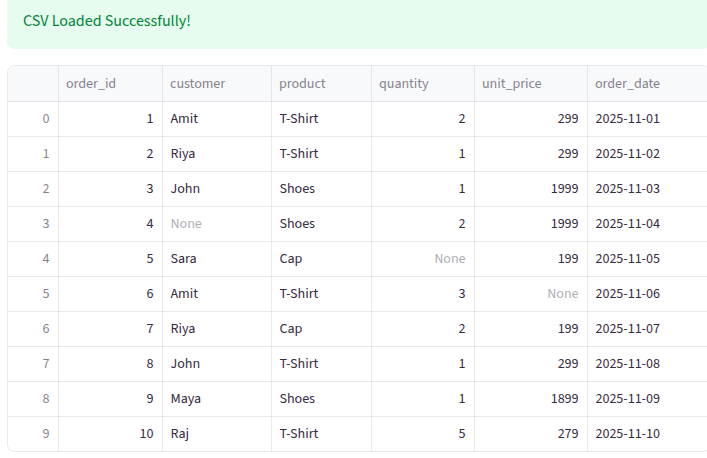
Code snippets that demonstrate common Pandas features :
import streamlit as st
import pandas as pd

st.title("Pandas Data Cleaning & Transformation – Full Demo")

# ---------------------------------------------------------
# 1. Load Data
# ---------------------------------------------------------
st.header("Load Data")

try:
    df = pd.read_csv("csvfile/pandas_demo_sales.csv")
    st.success("CSV Loaded Successfully!")
except FileNotFoundError:
    st.error("❌ File not found: csvfile/pandas_demo_sales.csv")
    st.stop()

st.dataframe(df)

# ---------------------------------------------------------
# 2. Inspect Data
# ---------------------------------------------------------
st.header("Inspect Data")

st.subheader("Shape of DataFrame")
st.write(df.shape)

st.subheader("Column Data Types")
st.write(df.dtypes)

st.subheader("Missing Values Per Column")
st.write(df.isnull().sum())

st.subheader("Preview of Data (Head)")
st.dataframe(df.head())

# ---------------------------------------------------------
# 3. Cleaning
# ---------------------------------------------------------
st.header("Data Cleaning Steps")

df_clean = df.copy()

df_clean = df_clean.rename(columns={"unit_price": "unit_price_inr"})
df_clean["order_date"] = pd.to_datetime(df_clean["order_date"])
df_clean["quantity"] = df_clean["quantity"].fillna(1).astype(int)

median_price = df_clean["unit_price_inr"].median(skipna=True)
df_clean["unit_price_inr"] = df_clean["unit_price_inr"].fillna(median_price)

df_clean["customer"] = df_clean["customer"].fillna("Unknown")

st.subheader("Median Price Used to Fill Missing Values")
st.write(median_price)

st.subheader("Cleaned DataFrame")
st.dataframe(df_clean)

# ---------------------------------------------------------
# 4. Transformations
# ---------------------------------------------------------
st.header("Data Transformations")

df_clean["total_price"] = df_clean["quantity"] * df_clean["unit_price_inr"]
df_clean["order_month"] = df_clean["order_date"].dt.to_period("M").astype(str)
df_clean["product_cat"] = df_clean["product"].astype("category")
df_clean["product_code"] = df_clean["product_cat"].cat.codes

st.subheader("Transformed DataFrame")
st.dataframe(df_clean)

# ---------------------------------------------------------
# 5. Aggregations
# ---------------------------------------------------------
st.header("Aggregation Results")

sales_by_product = df_clean.groupby("product").agg(
    total_quantity=("quantity", "sum"),
    total_revenue=("total_price", "sum"),
    orders=("order_id", "count")
).reset_index().sort_values("total_revenue", ascending=False)

monthly_sales = df_clean.groupby("order_month").agg(
    monthly_revenue=("total_price", "sum"),
    monthly_orders=("order_id", "count")
).reset_index().sort_values("order_month")

st.subheader("Sales by Product")
st.dataframe(sales_by_product)

st.subheader("Monthly Sales Summary")
st.dataframe(monthly_sales)

st.success("All steps completed successfully!")
Output for the tabular format:
2. NumPy
Category: Scientific Computing
Python is one of the most popular programming languages for data science, machine learning, and scientific computing. But when it comes to handling numbers and performing calculations efficiently, the built-in Python lists sometimes fall short. That’s where NumPy comes in.
Why NumPy is Important
Imagine you need to process thousands or millions of numbers.
Using plain Python lists would be slow and memory-heavy, especially for complex operations like matrix multiplication or statistical calculations.
NumPy solves these problems by:
- Optimized storage: It stores data in contiguous memory blocks, which makes computations faster.
- Vectorized operations: You can perform calculations on entire arrays without writing loops.
- Integration with other libraries: Pandas, Matplotlib, SciPy, and even machine learning libraries like TensorFlow rely on NumPy arrays.
Key Functionalities:
- N-dimensional Arrays: Offers the ndarray, a fast and flexible container for large datasets.
- Mathematical Operations: Performs complex linear algebra, Fourier transforms, and random number capabilities.
- Broadcasting: Allows you to perform arithmetic operations on arrays of different shapes.
- Integration: seamless integration with C/C++ and Fortran code.
Code snippets that demonstrate common NumPy features :
import numpy as np

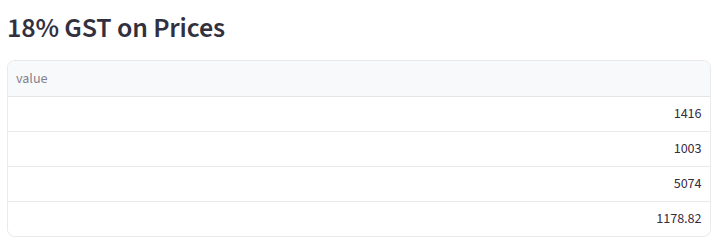
prices = np.array([1200, 850, 4300, 999])
tax = np.array([0.18])  # 18% GST
st.subheader("18% GST on Prices")

final_amount = prices + (prices * tax)
st.dataframe(final_amount)Output:
3. Requests
Category: Web & HTTP
requests is a Python library used to send HTTP/1.1 requests using simple Python methods like:
GETPOSTPUTDELETEPATCHHEAD
It abstracts the complexity of Python’s built-in urllib and gives you an elegant, human-friendly API.
Key Functionalities:
- API Interaction: Sends HTTP requests (GET, POST, PUT, DELETE) to web servers effortlessly.
- Parameter Handling: automatically adds query strings and form-encodes your POST data.
- Authentication: Handles various authentication types (Basic, Digest, OAuth) smoothly.
- Session Objects: Persists parameters (like cookies) across requests.
Example: Fetching data from an API
import requests

url = "https://jsonplaceholder.typicode.com/posts/1"
response = requests.get(url)

print("Status Code:", response.status_code)
print("Response JSON:", response.json())
Output:
Status Code: 200
Response JSON: {
    'userId': 1,
    'id': 1,
    'title': 'sunt aut facere repellat provident occaecati excepturi optio reprehenderit',
    'body': 'quia et suscipit\nsuscipit recusandae consequuntur...'
}
4. Matplotlib
Category: Data Visualization
Data visualization plays a crucial role in data analysis, machine learning, automation, and decision-making. For Python developers, the most widely used and powerful library for plotting and visual analysis is Matplotlib. Whether you are working with financial data, machine learning results, statistics, or business dashboards, Matplotlib allows you to create compelling visualizations with just a few lines of code.
In this blog post, we will explore Matplotlib, understand its key features, and walk through practical code examples you can use immediately.
What is Matplotlib?
Matplotlib is a comprehensive Python library for creating static, interactive, and animated visualizations. It supports many types of charts, such as:
- Line charts
- Bar charts
- Histograms
- Pie charts
- Scatter plots
- Heatmaps
- Subplots & grids
It is built on NumPy arrays and integrates seamlessly with Pandas, SciPy, Seaborn, and Jupyter Notebook.
To install:
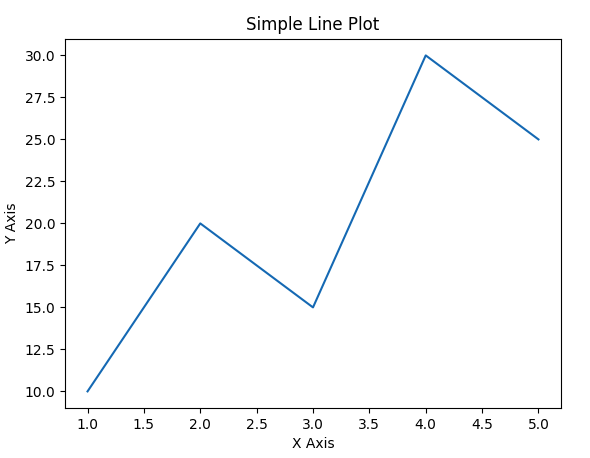
pip install matplotlibCode snippets that demonstrate Line charts:
import matplotlib.pyplot as plt

x = [1, 2, 3, 4, 5]
y = [10, 20, 15, 30, 25]

plt.plot(x, y)
plt.title("Simple Line Plot")
plt.xlabel("X Axis")
plt.ylabel("Y Axis")
# To show on UI uncomment it
#plt.show()

# Save output instead of showing
plt.savefig("output_plot.png")   # save in project folder
plt.close()
Output:
5. Scikit-Learn
Category: Machine Learning (Classical)
If you are stepping into the world of machine learning, one name you will hear again and again is Scikit-Learn. It is one of the most popular and easy-to-use libraries for building, training, and evaluating machine learning models. Whether you want to predict house prices, classify emails as spam or not spam, or cluster customers based on their behaviour, Scikit-Learn gives you all the tools in a clean and simple interface.
What makes Scikit-Learn special is its design philosophy: simplicity, consistency, and modularity. Almost every algorithm in the library follows the same pattern — create a model, fit it with training data, and then make predictions. This makes the learning curve smooth even for beginners.
Why is Scikit-Learn so widely used?
Here are some reasons why developers and data scientists love this library:
1. Large collection of algorithms
Scikit-Learn includes almost every traditional machine learning algorithm you can think of — Linear Regression, Logistic Regression, Decision Trees, Random Forest, K-Means, Naive Bayes, SVM, and many more.
2. Easy data preprocessing
Real-world data is rarely clean. The library provides tools for:
- handling missing values
- encoding categorical data
- scaling features
- splitting data into train/test
3. Consistent model workflow
Every model uses the same steps:
model = Algorithm()model.fit(X_train, y_train)predictions = model.predict(X_test)
This uniform approach saves a lot of time.
4. Works well with Pandas and NumPy
Scikit-Learn is designed to integrate smoothly with other Python libraries like Pandas, NumPy, and Matplotlib.
Key Functionalities:
- Classification: Identifying which category an object belongs to (e.g., Spam detection).
- Regression: Predicting a continuous-valued attribute associated with an object (e.g., Stock prices).
- Clustering: Automatic grouping of similar objects into sets (e.g., Customer segmentation).
- Preprocessing: Features for normalization, scaling, and encoding data before feeding it to models.
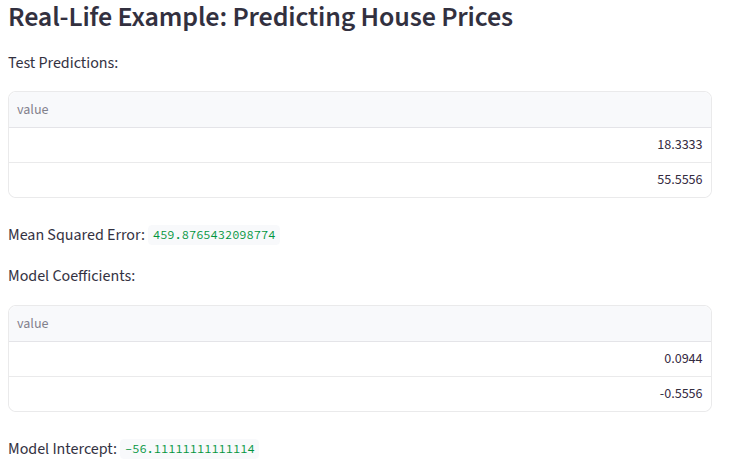
Real-Life Example: Predicting House Prices
Let’s walk through a simple machine learning example: predicting house prices using Linear Regression.
We will assume a dataset that contains:
- Area (sq. ft.)
- Number of bedrooms
- House price
Code snippets that demonstrate Line charts:
import pandas as pd
from sklearn.model_selection import train_test_split
from sklearn.linear_model import LinearRegression
from sklearn.metrics import mean_squared_error

# Sample dataset
data = {
    "area_sqft": [800, 1200, 1500, 1800, 2000, 2200],
    "bedrooms":  [2, 3, 3, 4, 4, 5],
    "price_lakh": [45, 70, 85, 110, 130, 150]
}

df = pd.DataFrame(data)

# Features (X) and Target (y)
X = df[["area_sqft", "bedrooms"]]
y = df["price_lakh"]

# Train/Test Split
X_train, X_test, y_train, y_test = train_test_split(
    X, y, test_size=0.2, random_state=42
)

# Create and train the model
model = LinearRegression()
model.fit(X_train, y_train)

# Make predictions
pred = model.predict(X_test)

# Evaluate the model
mse = mean_squared_error(y_test, pred)

st.subheader("Real-Life Example: Predicting House Prices")

st.write("Test Predictions:", pred)
st.write("Mean Squared Error:", mse)
st.write("Model Coefficients:", model.coef_)
st.write("Model Intercept:", model.intercept_)
Output:
6. TensorFlow
Category: Deep Learning & AI
Machine learning and artificial intelligence are transforming the way we interact with technology. If you are a Python developer wanting to build AI models, one of the first libraries you should learn is TensorFlow. Created by Google, TensorFlow is an open-source library that helps you design, train, and deploy machine learning models efficiently.
Whether you want to build image recognition systems, predictive models, or neural networks, TensorFlow provides a simple yet powerful platform to do it all.
Why TensorFlow is Popular
- Flexibility: You can build models for research, production, and mobile deployment.
- High Performance: It uses efficient computation graphs and can run on CPU, GPU, or TPU.
- Large Community: Extensive tutorials, documentation, and support.
- Integrations: Works well with Keras, NumPy, Pandas, and visualization tools like Matplotlib.
TensorFlow’s modular design lets beginners quickly start with pre-built models while also providing advanced users the flexibility to customize.
Key Functionalities:
- Neural Networks: flexible architecture for building and training deep learning models.
- Tensorboard: A visualization toolkit to track model metrics like loss and accuracy.
- Deployment: Models can be deployed on CPUs, GPUs, TPUs, mobile devices, and even in the browser (TensorFlow.js).
- Keras Integration: Uses Keras as a high-level API to make building models easier for beginners.
Code snippets that demonstrate Line charts:
import tensorflow as tf
import numpy as np

# Sample data: area (sq.ft) vs price (in lakh)
X = np.array([800, 1200, 1500, 1800, 2000, 2200], dtype=float)
y = np.array([45, 70, 85, 110, 130, 150], dtype=float)

# Build a simple linear model
model = tf.keras.Sequential([
    tf.keras.layers.Dense(units=1, input_shape=[1])
])

# Compile the model
model.compile(optimizer='adam', loss='mean_squared_error')

# Train the model
model.fit(X, y, epochs=500, verbose=0)

# Make predictions
area_test = np.array([1600, 2500], dtype=float)
predictions = model.predict(area_test)

st.title("Tensorflow")
print("Predicted Prices:", predictions.flatten())
Output :
Predicted Prices: [49.57787 77.29605]
7. BeautifulSoup (bs4)
Category: Web Scraping
In today’s digital world, information is everywhere on the web. If you want to extract data from websites automatically, Python provides a powerful and easy-to-use library called BeautifulSoup. It allows developers to scrape web pages, parse HTML, and extract the content they need for analysis or automation.
Whether you are collecting product prices, news headlines, or stock data, BeautifulSoup makes it simple to get structured data from unstructured HTML.
Why Use BeautifulSoup?
- Easy to Learn: Beginner-friendly syntax and clear documentation.
- Flexible Parsing: Supports HTML and XML files.
- Integration: Works well with requests, Pandas, and other Python libraries.
- Automation: Helps in creating scripts to extract data from multiple web pages.
Key Functionalities:
- HTML Parsing: Navigates the parse tree (the HTML structure) to locate specific tags.
- Search Methods: Finds elements by ID, class, CSS selector, or tag name using methods like .find() and .find_all().
- Broken HTML Handling: It is famous for being able to parse poorly written or “broken” HTML code without crashing.
- Data Extraction: Easily extracts text, links (hrefs), and image sources from web pages.
Installing BeautifulSoup
You can install BeautifulSoup using pip:
pip install beautifulsoup4
pip install lxml
beautifulsoup4: The core library for parsing HTML.
lxml: A fast parser recommended for performance.Real-Life Example: Scraping News Headlines
Let’s scrape a few headlines from a sample HTML page.
Python Code
import requests
from bs4 import BeautifulSoup

# URL to scrape
url = "https://example.com/news"

# Fetch the page content
response = requests.get(url)

# Check if the request was successful
if response.status_code == 200:
    html_content = response.text

    # Parse the HTML content
    soup = BeautifulSoup(html_content, "lxml")

    # Extract all headlines (assuming <h2> tags)
    headlines = soup.find_all("h2")

    # Print headlines
    print("News Headlines:")
    for i, headline in enumerate(headlines, start=1):
        print(f"{i}. {headline.get_text(strip=True)}")
else:
    print("Failed to retrieve the webpage.")
Output:

News Headlines:
1. Python 4.0 Features Revealed
2. New AI Model Predicts Stock Prices
3. Web Scraping Trends in 2025
Top Python Libraries with Official Links
Conclusion
Python’s vast library ecosystem makes it the ultimate choice for developers, data scientists, and AI enthusiasts. Libraries like Pandas, NumPy, Scikit-learn, TensorFlow, Flask, and BeautifulSoup empower you to handle data analysis, machine learning, web development, and automation with ease.
By leveraging these powerful Python libraries, you can boost productivity, build scalable applications, and explore cutting-edge technologies. Whether you’re a beginner or an experienced developer, mastering these libraries is key to unlocking the full potential of Python and accelerating your projects.